Table of Contents
- User Guide
- Getting Started
- General Concepts
- Getting Help
- Requesting a Feature
- Frequently Asked Questions
- Videos for Learning TroopTrack
- Plan
- Planning an Event
- Tracking Attendance
- Attendance Reports
- Hours, Miles, and Nights
- Agenda View
- Year at a Glance
- RSVP'ing for an Event
- Import your unit's calendar to Google Calendar
- Importing Your Unit Calendar into the Mac OS Calendar App
- Event Integrated Accounting
- Manage
- Registering Members
- Controlling Access and Privileges
- Organizing Family Members
- Creating Patrols/Dens
- Managing Equipment
- Managing a Library
- Canned Reports
- Creating Custom Reports
- Unit Settings
- Money Account Basics
- User Accounts
- Managing Training
- How do I reset a user's password?
- Fundraisers
- Accept Payments Through TroopTrack
- Communicate
- Achieve
- Bulk Entry of Award Progress
- Individual Entry
- Creating a Custom Award
- Planning for a Meeting or Court of Honor
- Share
- Sharing Photos
- Creating a Web Site (Public and Private)
- Sharing Links
- Sharing Documents
- Automatic Monthly Newsletter
- Frequently Asked Questions
Creating Custom Reports
What You Can Do
Custom reports are reports you create based on your needs. You can create a report from various data elements, save it so you can use it over and over again, view the results of the report, and download it as a csv or pdf file.
How to Get There
You can get to custom reports from the Manage Badge drop down menu as shown below.
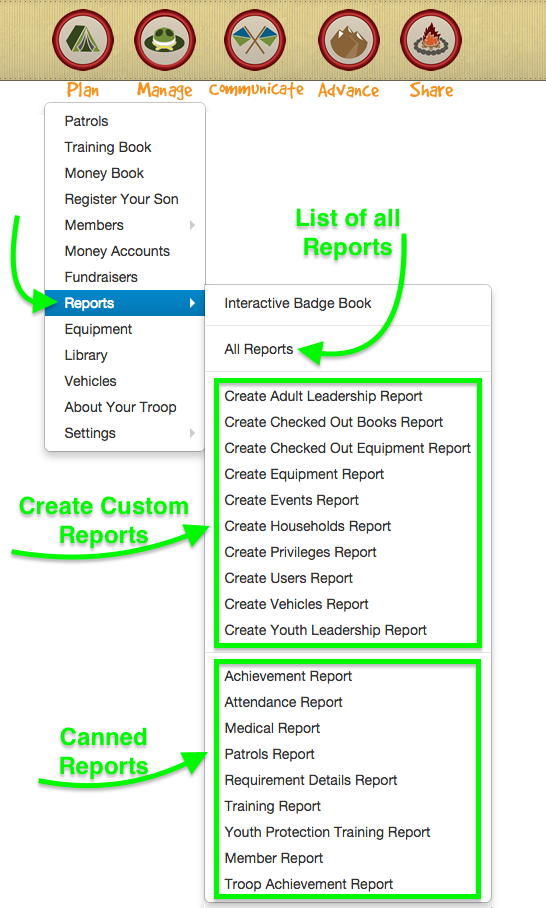
Create a New Report
To create a new report, first choose what type of report to create as shown in the previous screen shot. At that point a form like the following will appear:

Give the report a nice title so that you will remember what it is months later and so that other members of your scouting unit will understand what it is as well. Then check off each field you'd like in the report. If you want it to be sorted in a specific way, use the sort by drop down to set the sort. Click "Create Report" to save the report and to see its results. Here's a sample user report I created for determining who is eligible to be inducted into the Order of the Arrow.

After you create a report you can access it anytime from the report powerbar.
How to Request a New Type of Custom Report
Don't see the type of report you'd like to create or think an existing report type is missing important fields? Just open a support ticket, describe what you'd like to be able to do, and I'll do my best to make the data available for you to report on.