Table of Contents
- User Guide
- Getting Started
- General Concepts
- Getting Help
- Requesting a Feature
- Frequently Asked Questions
- Videos for Learning TroopTrack
- Plan
- Planning an Event
- Tracking Attendance
- Attendance Reports
- Hours, Miles, and Nights
- Agenda View
- Year at a Glance
- RSVP'ing for an Event
- Import your unit's calendar to Google Calendar
- Importing Your Unit Calendar into the Mac OS Calendar App
- Event Integrated Accounting
- Manage
- Registering Members
- Controlling Access and Privileges
- Organizing Family Members
- Creating Patrols/Dens
- Managing Equipment
- Managing a Library
- Canned Reports
- Creating Custom Reports
- Unit Settings
- Money Account Basics
- User Accounts
- Managing Training
- How do I reset a user's password?
- Fundraisers
- Accept Payments Through TroopTrack
- Communicate
- Achieve
- Bulk Entry of Award Progress
- Individual Entry
- Creating a Custom Award
- Planning for a Meeting or Court of Honor
- Share
- Sharing Photos
- Creating a Web Site (Public and Private)
- Sharing Links
- Sharing Documents
- Automatic Monthly Newsletter
- Frequently Asked Questions
Controlling Access and Privileges
How to Get There
You can edit a user's access and privilieges from their profile. To get to a users profile, click QuickNav>Members. You can also get to their profile using the Manage badge.
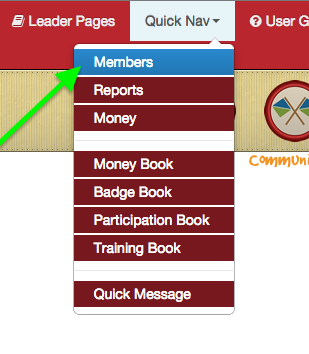
Once you are on a user's profile, look for the section titled Privileges, as seen below:
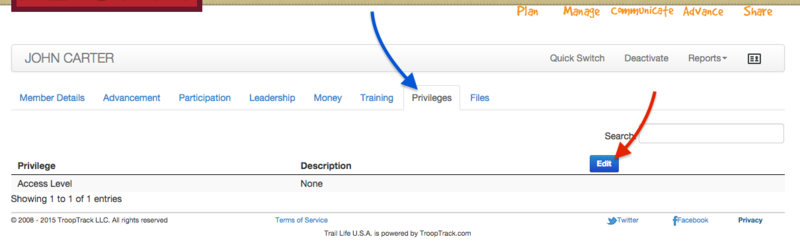
Editing a user's access level and privileges is easy. Just click on the Edit button (shown above), fill out the following form, and click Save.
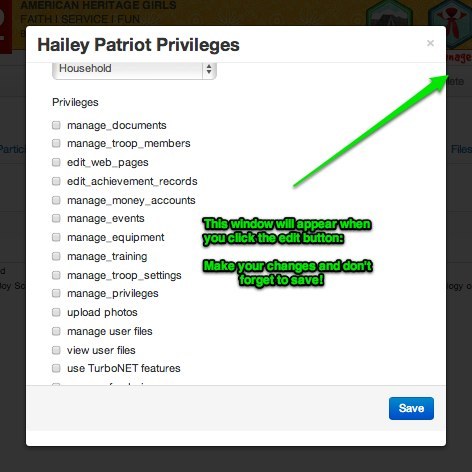
Access Levels Control Who a Member Can See
Access levels control WHO in the troop this user has access to. The following table describes each available access level.
| Access Level | Gives Them Access To... |
|---|---|
| None | No one! Not even themself! This access level is generally reserved for users who never log in. |
| Self | Just them. This is a common access level for scouts. |
| Household | Every member of their household. This is a good access level for parents. |
| Patrol/Den | Everyone in their patrol or den. This is a good access level for den leaders, patrol leaders, and adult leaders assigned to a patrol. |
| Unit | Everyone in the troop or pack. This is a good access level for scoutmasters, cubmasters, advancement chairs, senior patrol leaders, etc. |
Privileges Control What a Member Can Do
The second green box shows the privileges a user could be given. Check or uncheck privileges as appropriate and then click "Update User" when you are done.
Here are the privileges you can choose from:
Privilege Description
Manage Documents Add, edit, or delete documents from the troop library
Manage Troop Members Add, edit, or delete troop members and create mailing lists
Edit Web Pages Create, edit, and delete web pages
Edit Achievement Records Edit user achievement records
Manage Money Accounts Add debits and credits to youth money accounts
Manage Events Create, edit and delete events
Manage Equipment Create, update, and delete unit equipment records
Manage Training Create, update, and delete unit training records
Manage Troop Settings Update/edit Troop Settings (domain name, account owner)
Manage Privileges Add, edit, or delete user privileges
Upload Photos Add photos to existing photo albumn
Manage User Files See file tab for all users within their access level. Can add files to it.
View User Files Can see all files withing your access level.
Use TurboNet features BSA units can use this feature to upload advancements to BSA
Manage Fundraisers Track and record fundraiser transactions
View all Money Accounts Allows user to SEE (only) all money accounts