Table of Contents
- User Guide
- Getting Started
- General Concepts
- Getting Help
- Requesting a Feature
- Frequently Asked Questions
- Videos for Learning TroopTrack
- Plan
- Planning an Event
- Tracking Attendance
- Attendance Reports
- Hours, Miles, and Nights
- Agenda View
- Year at a Glance
- RSVP'ing for an Event
- Import your unit's calendar to Google Calendar
- Importing Your Unit Calendar into the Mac OS Calendar App
- Event Integrated Accounting
- Manage
- Registering Members
- Controlling Access and Privileges
- Organizing Family Members
- Creating Patrols/Dens
- Managing Equipment
- Managing a Library
- Canned Reports
- Creating Custom Reports
- Unit Settings
- Money Account Basics
- User Accounts
- Managing Training
- How do I reset a user's password?
- Fundraisers
- Accept Payments Through TroopTrack
- Communicate
- Achieve
- Bulk Entry of Award Progress
- Individual Entry
- Creating a Custom Award
- Planning for a Meeting or Court of Honor
- Share
- Sharing Photos
- Creating a Web Site (Public and Private)
- Sharing Links
- Sharing Documents
- Automatic Monthly Newsletter
- Frequently Asked Questions
Managing Equipment
What You Can Do
TroopTrack let's you create a quartermaster's corner where you can keep track of all the equipment in your troop or pack. You can keep track of the condition of your equipment items, who has them, and what patrol or den is responsible for them. You can also control who can edit equipment information using the manage equipment privilege. Many troops like to give this privilege to scouts.
How to Get There
Like most things, you can get to the quartermaster's corner using the Manage Badge menu.
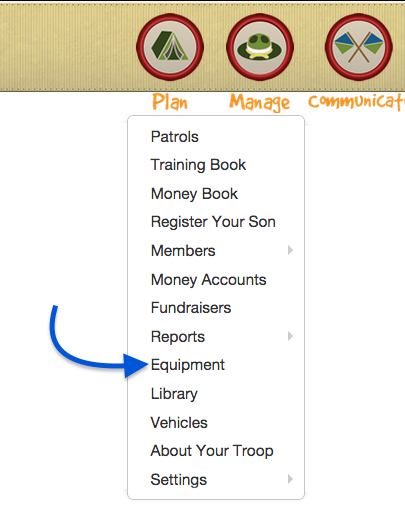
Managing Equipment
The Quartermaster's Corner looks like this. Some features will only be visible to user's with the manage equipment privilege.

Whether you are adding or editing an equipment item, the form will be the same, as shown below:

Patrol/Den: If a den or patrol is responsible for this piece of equipment, choose them here
Name: Give the item a name, like "Tent #1". If you have marked the equipment in some way, use that mark here.
Description: Provide any additional information that might be needed to help someone decide if the equipment will meet their needs.
Condition: It's a good idea to keep track of the condition of the item and update it whenever the item is checked out or returned.
Location: Some units have multiple locations for their equipment, like a scout closet, scout shed, and scout trailer. Use this field to keep track of where your stuff is kept.
Photo: A picture is worth a 1000 words. Take a picture and upload it with this form. Picture size must be less than 1 MB.